To create a new E-mail account
Your default E-mail account is yourdomain@yourdomain.com. For example, the default E-mail account for testcvdomain.com is testcvdomain@testcvdomain.com. Depending on your plan, you may create additional E-mail accounts at no cost.
To create a new E-mail account
 To
create a new E-mail account:
To
create a new E-mail account:
|
1 |
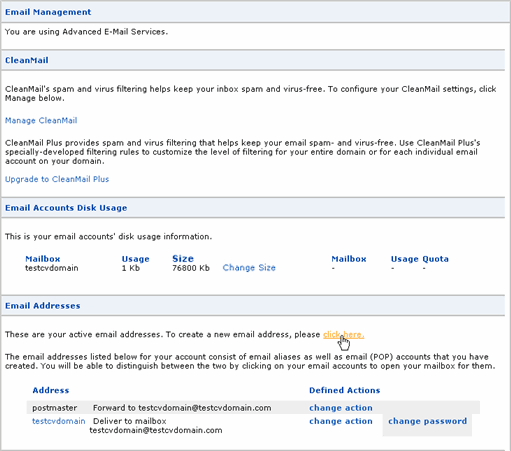
Click Email in the main navigation menu of SiteControl. |
|
2 |
Under the Email Addresses section, click click here.
|
|
3 |
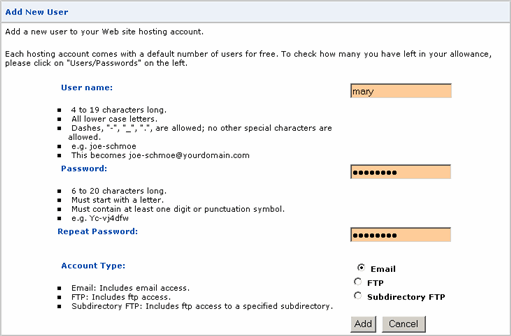
Enter the name of the new E-mail address and select New Account. In this example, let's create one called "mary".
|
|
4 |
Click Add Action. |
|
5 |
Now set its password and verify that the Account Type is set to Email.
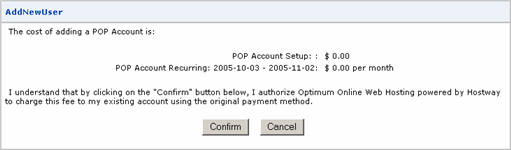
Click Add and then click Confirm.
|
|
6 |
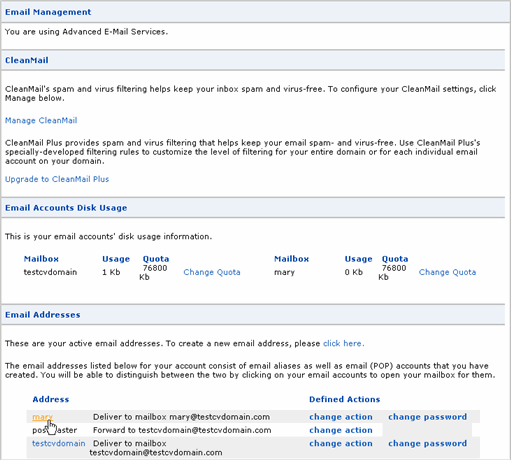
Assuming Propagation has already been completed, you may begin to use new E-mail accounts immediately. |
|
1 |
You have two choices: use our Web-based E-mail application, SiteMail, or your own E-mail client (e.g. Outlook). |
|
2 |
To use SiteMail, click Email in the main navigation menu of SiteControl. Under the Email Addresses section, click the appropriate link of the E-mail account you wish to access and you will be automatically logged in to SiteMail.
Alternatively, you can access SiteMail directly at http://sitemail.webhosting.optonline.net and manually log in using the full E-mail address (e.g. mary@testcvdomain.com) and its password. |
|
3 |
If you prefer to use your own E-mail client, then please refer to Configure E-mail Clients. |